Post from October 15, 2022, supplemented for the redesign. The examples show the state at the time and are not tested instructions for today's website. Respect the provider's terms, request limits and robots.txt; a limit is not an invitation to bypass it.
One problem with large searches is a cap on the number of results. Here I use the Python package geoiter to split a geographic area into smaller searches – then look at moving a synchronous HTTP client to an asynchronous one.
The problem
In the example, a search for VW Golf offers in Germany showed around 31,333 results but only allowed navigation through 20 pages of 20 results each.
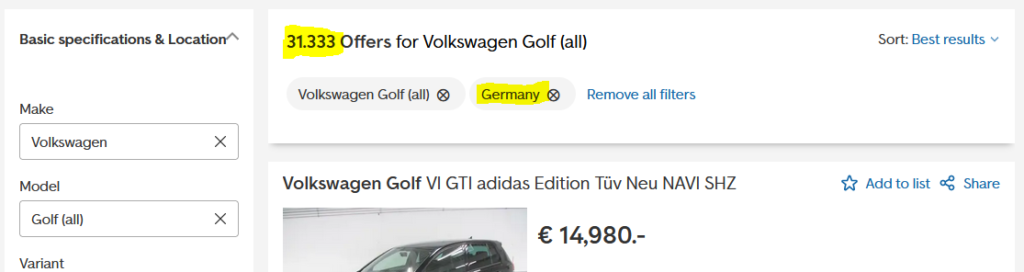

Changing the page number in the URL did not return further results back then. One possible approach is to split the geographic area into smaller search areas – provided the provider allows this kind of querying.
Midpoints with geoiter
geoiter yields midpoints within a boundary. First install the package:
python -m pip install geoiterUsing the example data we generate a list of midpoints. The original post missed the parentheses when calling get_german_border(); this is corrected below.
# main.py
from geoiter.util.ressource_example import get_german_border
# this is a example list of coordinates. You may get you own from open street map or other geospatial services.
from geoiter import GeoIter

german_border = get_german_border()

gi = GeoIter(
    boundary=german_border,
    radius=100,
    comp_rate=20
    )

midpoints = list(gi) #  consume that iterator at once
print(len(midpoints), midpoints)

# prints:
# 18 [(54.184302636275454, 10.4540982), (54.14901311305548, 7.535786698090457), ...]
With a radius of 100 km the example produced 18 circles. 30,000 results divided by 18 is about 1,667 on average per circle – not 3,333. With at most 400 per query, at least 75 queries would be needed under an even distribution, but real offers aren't evenly distributed. A radius of 30 km was my experiment at the time, not a guarantee of complete coverage. Overlap also produces duplicates.
Synchronous example
The original script uses httpx and lxml, takes two example midpoints and reads search pages. The code below is preserved as historical material. It has known issues: old CSS selectors and URL, an incorrect extra page when the result count is exactly divisible by 20, and no deduplication. Don't run it without review.
# main.py
import math
import httpx  # or any other popular http client.
from lxml.html import fromstring  # or use bs4

from geoiter.util.ressource_example import get_german_border
# this is a example list of coordinates. You may get you own from open street map or other geospatial services.
from geoiter import GeoIter

german_border = get_german_border()

# we keep a reference here
query_radius = 30

gi = GeoIter(
    boundary=german_border,
    radius=query_radius,
    comp_rate=20
)

midpoints = list(gi)  # consume that iterator at once
print(len(midpoints), midpoints[:2])

base_url = r"https://www.autoscout24.com/lst/volkswagen/golf-(" \
           r"all)?sort=standard&desc=0&atype=C&ustate=N%2CU&powertype=kw "


def parse_offers(body_tree):
    # prints the results of one html page with max. 20 offers
    articles = body_tree.xpath("//article")
    for article in articles:
        title = article.xpath(".//h2/text()")[0]
        price = article.xpath(".//p/text()")[0]
        print(title, price)


def main():
    # here we limit the coordinates just for demo purposes.
    for coordinate in midpoints[100:102]:
        query_url = f"{base_url}&lon={coordinate[1]}&lat={coordinate[0]}&zipr={query_radius}"
        response = httpx.get(query_url)
        assert response.status_code == 200
        body_tree = fromstring(response.text)
        query_size = body_tree.xpath("//div[@class='ListHeader_top__jY34N']/h1/span/span/text()")[0]
        if query_size:
            parse_offers(body_tree)
            more_pages = int(query_size) // 20
            print(f"I need to scrape now {query_size} offers or {more_pages} more page(s).")

            for page in range(1, more_pages + 1):
                response = httpx.get(query_url + f"&page={page + 1}")
                body_tree = fromstring(response.text)
                parse_offers(body_tree)


if __name__ == '__main__':
    main()
Asynchronous example
The following variant uses httpx.AsyncClient and multiple tasks. Async does not automatically mean faster, and certainly doesn't mean unlimited requests: concurrency and retries need to respect the server and its policies. This historical code hasn't been tested against today's site and may also pass an empty task set to asyncio.wait().
# main.py
import asyncio
import httpx  # or any other popular http client.
from lxml.html import fromstring  # or use bs4

from geoiter.util.ressource_example import get_german_border
# this is a example list of coordinates. You may get you own from open street map or other geospatial services.
from geoiter import GeoIter

german_border = get_german_border()

query_radius = 30

gi = GeoIter(
    boundary=german_border,
    radius=query_radius,
    comp_rate=20
)

midpoints = list(gi)  # consume that iterator at once
print(len(midpoints), midpoints[:2])

base_url = r"https://www.autoscout24.com/lst/volkswagen/golf-(" \
           r"all)?sort=standard&desc=0&atype=C&ustate=N%2CU&powertype=kw "


def parse_offers(body_tree):
    articles = body_tree.xpath("//article")
    for article in articles:
        title = article.xpath(".//h2/text()")[0]
        price = article.xpath(".//p/text()")[0]
        print(title, price)


async def fetch_page(client, query_url):
    response = await client.get(query_url)
    body_tree = fromstring(response.text)
    parse_offers(body_tree)


async def fetch_query_coro(client, query_url, loop):
    response = await client.get(query_url)
    assert response.status_code == 200
    body_tree = fromstring(response.text)
    query_size = body_tree.xpath("//div[@class='ListHeader_top__jY34N']/h1/span/span/text()")[0]
    if query_size:
        parse_offers(body_tree)
        more_pages = int(query_size) // 20
        print(f"I need to scrape now {query_size} offers or {more_pages} more page(s).")

        pending = set()
        for page in range(1, more_pages + 1):
            pending.add(
                loop.create_task(fetch_page(client, query_url + f"&page={page + 1}"))
            )
        done, pending = await asyncio.wait(pending)


async def main():
    client = httpx.AsyncClient()
    loop = asyncio.get_event_loop()
    async with client:
        pending = []
        for coordinate in midpoints[100:102]:
            query_url = f"{base_url}&lon={coordinate[1]}&lat={coordinate[0]}&zipr={query_radius}"
            pending.append(
                loop.create_task(fetch_query_coro(client, query_url, loop))
            )
        done, pending = await asyncio.wait(pending)


if __name__ == '__main__':
    asyncio.run(main(), debug=True)
The basic idea remains: create geographic subareas and process results in a controlled way. For real use, start with an authorised interface, deduplicate results, respect limits and add error handling.